Experience, from exploration to expertise

I really believe in creative problem solving — going places users might find obvious, but where real differences can be made. I try to work with a mindset that treats outside-the-box thinking as standard, aiming for outcomes that go beyond what’s expected.
Experience introduction
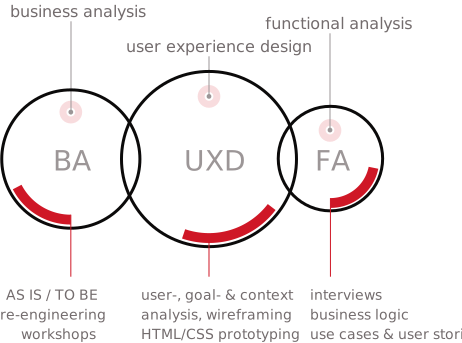
That often means tackling challenges that fall outside typical UX roles. It’s where being able to switch hats shows its value — shifting between user experience design and business analysis, filling in functional gaps, or supporting frontend teams with structure and logic. Always working toward balance: between people, their mental models, and the way applications can support their goals.
Everything I’ve learned started with spotting an opportunity just outside the familiar path. At one point, facilitating workshops was new. So was business analysis. And design systems felt like a vague deliverable. But with every step into unfamiliar territory, I picked up the tools I needed to make things work — even when the input was unstructured or the problem unclear.
This mix of curiosity, structure, and adaptability continues to shape how I work today.
Experience infographic
Résumé highlights
- 15+ years of experience in enterprise UX
- Active in healthcare, industry, and government environments
- Strong mix of UX, business analysis, and functional modeling
- Hands-on with prototyping (Figma, Penpot, HTML/CSS)
- Experienced in creating/maintaining design systems – atomic design approach
- Facilitates workshops that create an innovative atmosphere — combining energy, real input, and outside-the-box thinking
- Comfortable switching between UX, BA, FA in agile environments
- Fluent in Dutch and English — possibility to manage projects in German
Methodologies I rely on
Common sense goes a long way — but often, your work needs to deliver predictable, consistent results. To support collaboration and ensure quality, I rely on a mix of methodologies I’ve learned and shaped over the years — adapting what’s needed, when it’s needed.
Toggle Methodologies section
Methodologies I rely on
Common sense goes a long way — but often, your work needs to deliver predictable, consistent results. To support collaboration and ensure quality, I rely on a mix of methodologies I’ve learned and shaped over the years — adapting what’s needed, when it’s needed.
- User Experience Design (UXD) – the core of how I work: user-, task/goal-, and context analysis, information architecture, design, and iteration.
- Business process modeling (BPMN) – for visualising flows and aligning across roles.
- Functional modeling (UML, flowcharts) – when logic, data, and decision trees need structure.
- Design systems (thinking) – following an atomic design structure to create scalable, reusable building blocks.
- Agile & SCRUM practices – collaborating with dev teams and stakeholders across iterations.
Practices & skills
Some skills I’ve developed through years of project work and learning. Others feel more instinctive — areas where I naturally feel at home. Whether it’s a technique I’ve refined or a strength I’ve shaped over time, they all contribute.
Toggle Practices & skills section
Practices & skills
Some skills I’ve developed through years of project work and learning. Others feel more instinctive — areas where I naturally feel at home. Whether it’s a technique I’ve refined or a strength I’ve shaped over time, they all contribute.
-
Workshop facilitation & live wireframing
Facilitating sessions where problems, people, and ideas meet — and taking part as more than a moderator. I sketch while we talk, think out loud while visualising, and keep the conversation moving until structure and possibilities start to take shape. These sessions are not just about drawing — they're about activating collective thinking. I provide the medium, but the group brings the momentum. Here’s where the UX-team of 2 thrives.- Live wireframing
- Visual communication
- Facilitation
- Real-time sketching
- UX-team of 2
-
Prototyping — from paper to pixel (or browser)
Whether it's pen and paper, Figma, Penpot, or HTML/CSS — I use the tool that best fits the phase and the team. No need to get lost in the complexity — I use these tools to clarify ideas and keep things moving. The ability to prototype in code isn't a requirement for UX, but it often removes barriers and even adds to the shared understanding.- Prototyping
- Front-end collaboration
- Penpot / HTML-CSS
- Responsive design
-
Creative thinking & collaborative ideation
I value creativity highly — not just as inspiration, but as a working method. Thinking outside the box isn’t a luxury in enterprise UX — it’s how we uncover real solutions. Whether we’re mapping a process or stuck in ambiguity, I try to create space where ideas can move beyond the obvious. Sometimes, simplifying complexity is the most creative act of all.- Creative problem solving
- Making complexity feel intuitive
- Complex vs complicated
- Outside-the-box thinking
- User–business alignment
- Information architecture
-
Working languages
Multilingual fluency adds flexibility in workshops, interviews, and documentation. These are the languages I work in, and how comfortably I use them.Dutch
nativeFrench
conversationalGerman
working knowledgeEnglish
fluent
Tools I work with
Tools come and go, as enablers — not definitions.
They help us connect ideas, collaborate with others, and shape outcomes — but they should never limit creativity. The most basic ones — pen and paper — are still the most reliable. The rest depends on the project, the team, and what needs to happen next.
Toggle Tools section
Tools I work with
Tools come and go, as enablers — not definitions.
They help us connect ideas, collaborate with others, and shape outcomes — but they should never limit creativity. The most basic ones — pen and paper — are still the most reliable. The rest depends on the project, the team, and what needs to happen next.
- Everyday tools
- Pen & paper
- Whiteboard
- Figma
- Penpot
- Adobe Creative Suite
- Miro
- Confluence
- Zeroheight
- Visual Studio Code
- BizAgi Process Modeler
- MS Office
- Various collab tools
- Favourite AI tools
- ChatGPT
- Gemini
- Perplexity
- NotebookLM
- TurboScribe
- Consensus
Training & education
I’m a solid believer in learning on the job — but to gain traction and build confidence, training defenitely helps. I try to balance structured training with the constant stream of articles, talks, and inspiration that comes with the field. The challenge? Figuring out what’s actually useful right now.
That — and sleep.
Toggle Training & education section
Training & education
I’m a solid believer in learning on the job — but to gain traction and build confidence, training defenitely helps. I try to balance structured training with the constant stream of articles, talks, and inspiration that comes with the field. The challenge? Figuring out what’s actually useful right now.
That — and sleep.
Formal education & certifications
- UX‑PM1 International Certification - UX Alliance2023
- Generative Artificial Intelligence Training Certificate lvl 1 — Inetum2023
- User Experience Design Certification Program — Human Interface Group2012
- Project Management Training — Propellor2010
- Introduction to SOA Governance / ITIL / UML for SE / BPM — Dolmen2007–2008
- Result‑Oriented Management — Arenberg Consult2005
- Bachelor’s Degree Business Management & Marketing1997
Selected training & masterclasses
UX & Product Design
- Cognitive Biases 101: How They Impact Users, Research, and Teams
- Creating and Maintaining Successful Design Systems
- Meets AI: Designing for AI, AI & ethics, AI for devs
- Designing For Complex UIs (2022 & 2024 editions)
- Psychology for UX And Product Design
- Design System Planning and Process
- Inclusive Design Patterns For 2025
- Design for What’s Next - workshop on AI / design ethics
- Fixing Frustrating Design Patterns For 2025
- The Future of Design Systems
- Designing Search UX In 2024
- Training Digital Accessibility
- Scalable design systems
Front-end, prototyping & tooling
- Modern CSS Meets
- Interface design with UI Kits - Penpot.app Hands‑On
- Advanced Flex layouts - Penpot.app Hands‑On
- Accessibility Meets Dataviz accessibility / Designing for accessibility right from the start
- Real World Responsive Design
- Advanced CSS layouts with Flexbox and Grid
- Training Bootstrap
- WebDevSquad Training Flexbox
Business & Functional Analysis
- Training business process analysis methodology
- R–Brains SCRUM
- R–Brains BAPM: Project Management
- R–Brains Use Case Analysis
- Training BPM (Business Process management)
- Testmanagement
- Interviewing techniques
Knowledge sharing
Sharing knowledge is one of the most fulfilling parts of my work. I’ve found that explaining what you know — and repeating it in different contexts — often deepens your own understanding.
Sometimes that means short sessions to lift part of a bigger picture. Other times, it’s a multi-day deep dive into the edges of UX.
I’ve shared my experience in many settings: internally within the company, directly with clients during projects, and as a guest lecturer at one university and several higher education programs.
Toggle Knowledge sharing section
Knowledge sharing
Sharing knowledge is one of the most fulfilling parts of my work. I’ve found that explaining what you know — and repeating it in different contexts — often deepens your own understanding.
Sometimes that means short sessions to lift part of a bigger picture. Other times, it’s a multi-day deep dive into the edges of UX.
I’ve shared my experience in many settings: internally within the company, directly with clients during projects, and as a guest lecturer at one university and several higher education programs.
Talks & Guest Lectures
-
2025
Enterprise UX with focus on UX methodology, live wireframing, prototyping, and design systems (guest seminar)
-
2025
UXD methodology and its role in enterprise software (guest lecture)
-
2025
The World of UX (guest lecture)
-
2024
User Experience Design (1‑day training)
-
2023
The (enterprise) UX‑team of 2
-
202220212019
Guest lecture on UX for Human Health Engineering
Internal & Client-Side Training
-
2023
UXD, wireframing, prototyping, design patterns (March & Nov 2‑day training)
-
2022
UXD, wireframing, prototyping, design patterns (March & Nov 2‑day training)
-
2022
Design pattern presentations (part 1 & 2)
-
2011–2021
UXD & prototyping fundamentals (multiple presentations / trainings)
Mentoring
-
2019–2020
Long‑term mentor for a junior UX designer
-
Ongoing
Ad‑hoc mentoring of colleagues
Previous & current work environments
My career started while I was still in school — studying during the day and working evenings as a desktop publisher at the advertising agency at home. That kind of switching never really stopped. Since 1994, I’ve moved across creative, technical, and analytical roles — from early web development to functional analysis and enterprise UX consulting.
I’ve worked in smaller webdev agencies, client-facing roles, and large organizations. And since 2003, I’ve also run IGNITE as a part-time freelance practice, giving me space to experiment and bring fresh ideas into my day-to-day work.
Toggle Previous & current work environments section
Previous & current work environments
My career started while I was still in school — studying during the day and working evenings as a desktop publisher at the advertising agency at home. That kind of switching never really stopped. Since 1994, I’ve moved across creative, technical, and analytical roles — from early web development to functional analysis and enterprise UX consulting.
I’ve worked in smaller webdev agencies, client-facing roles, and large organizations. And since 2003, I’ve also run IGNITE as a part-time freelance practice, giving me space to experiment and bring fresh ideas into my day-to-day work.
-
2007–present
UX consultant, Business analyst, FA, PM, proxy PO, project lead
-
2003–present
Independent web development, corporate design, managed hosting services
(owner — part-time freelance) -
2004–2007
Project coordinator, web dev lead, functional analyst, presales, trainer
-
2000–2004
Web dev, project lead, client-facing roles
-
1997–2000
DTP, creative design & templating strategy for brochures
-
1994–2001
DTP operator, advertising & corporate design
Let’s find out how enterprise UX can work for your project
Discover how blending UX, business analysis, and front-end know-how helps bridge gaps between users, stakeholders, and developers.
Explore my services